

Table of Contents
You sit down at your desk around 8:30 AM. You check emails, join a Zoom call, power through a project, grab lunch over your keyboard, and before you know it—the clock reads 5:30 PM and you haven’t moved in hours.
Sound familiar?
If you work in Alexandria—whether in Old Town, the West End, or anywhere in between—your job probably involves a lot of sitting. And your back is letting you know.
That dull ache between your shoulders. The stiffness in your lower back when you stand up. The occasional sharp twinge when you turn the wrong way.
It’s not just you. It’s your desk job.
But here’s the good news: you don’t have to quit your job to save your spine. You don’t need a complete office overhaul or expensive equipment. What you need are small, simple fixes that actually work.
Dr. Makda has spent over 25 years helping Alexandria professionals undo the damage caused by hours of sitting. In this post, she shares five straightforward adjustments you can start using today—no gym membership required.
Let’s get started.

The 90-Degree Rule
our body was designed to move—not to fold in half for eight hours straight.
When you sit at a desk, especially if you’re leaning forward toward your screen, your hips bend past a 90-degree angle. This position compresses the discs in your lower back and forces the muscles around your spine to work overtime just to keep you upright.
Over time, that compression adds up. It leads to stiffness, nagging aches, and eventually—pain that doesn’t go away when you stand up.
The Fix
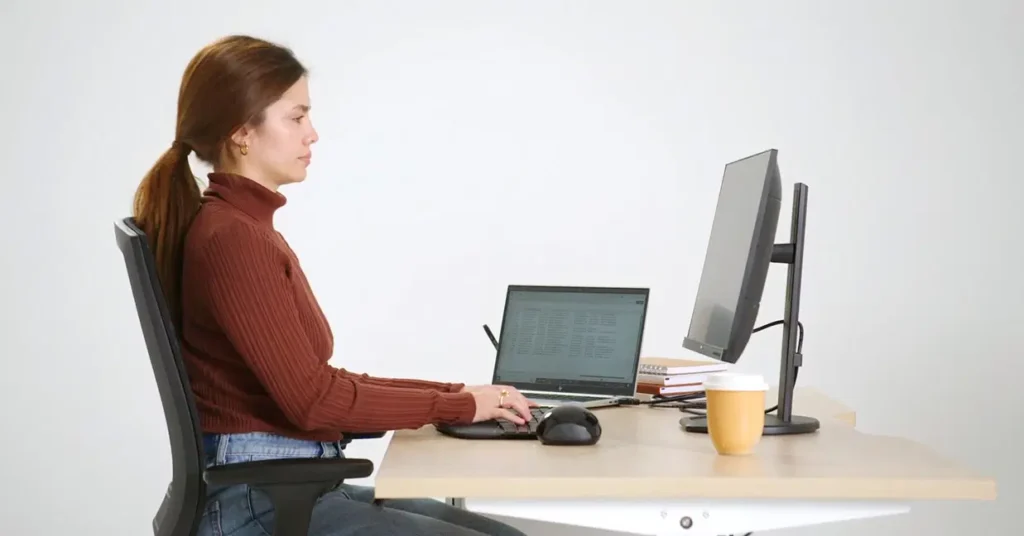
Adjust your chair so your hips and knees form a comfortable 90-degree angle.
Your feet should rest flat on the floor
Your knees should be level with or slightly lower than your hips
If your feet don’t reach the floor, use a footrest (a small box or thick book works in a pinch)
This simple change takes pressure off your lower back and keeps your spine in a neutral, supported position. It’s the foundation of good sitting posture—and it costs nothing to fix.
Quick Check
Sit as you normally would. Now answer this:
Can you slide your hand comfortably between your thigh and the front of your chair?
Are your feet flat?
Do you feel like you’re sitting “on” your sit bones, not leaning back or slouching forward?
If you answered no to any of these, take 30 seconds right now to adjust. Your back will thank you by the end of the day.
Why Dr. Makda Recommends This
*”Most people don’t realize how much their chair setup affects their spine. The 90-degree rule is the first thing I check with patients who spend their days at a desk. It’s simple, it’s free, and it works.”* – Dr. Makda
Check Your Screen Height

Look straight ahead. Right now, at this moment—where is your eye level?
If you’re looking down at your laptop screen, your neck is bent forward. This position is called “tech neck,” and it’s one of the fastest ways to develop chronic neck pain, tension headaches, and upper back stiffness.
Here’s what happens: your head weighs about 10–12 pounds. For every inch you tilt it forward, the strain on your neck muscles doubles. At a 45-degree angle, your neck is supporting nearly 50 pounds of force.
Now imagine holding that position for eight hours a day, five days a week. Your neck wasn’t designed for that.
The Fix
Raise your screen so the top third is at eye level.
If you use a laptop, invest in a separate monitor or a laptop stand
If you’re using a desktop, adjust your monitor height or add a riser
Once your screen is raised, you may need an external keyboard and mouse so your arms stay relaxed at your sides
When your screen is at the right height, your gaze should fall naturally on the center of the screen without tilting your head up or down. Your shoulders relax. Your neck straightens. The strain disappears.
Quick Check
Take a look at your setup right now:
Is your chin jutting forward toward the screen?
Are your shoulders creeping up toward your ears?
Do you feel any tension at the base of your skull?
If you answered yes to any of these, adjust your screen height immediately. Even a small change makes a big difference.
Why Dr. Makda Recommends This
“I see so many patients with headaches and neck pain who never connect it to their screen height. Once they raise their monitor, the improvement is often dramatic. It’s one of the easiest fixes I know.” – Dr. Makda
The "Every Hour" Rule
Here’s a simple promise you can make to yourself starting today: every hour, stand up for two minutes.
That’s it. Just two minutes.
Walk to the water cooler. Stretch your legs. Look out the window. Do a quick lap around your office or home. It doesn’t have to be complicated—it just has to happen.
Why It Works
Your spinal discs don’t have their own blood supply. They rely on movement to absorb nutrients and stay hydrated. When you sit for hours without moving, those discs slowly compress and lose fluid. That’s why your back often feels stiff after a long day—and why that stiffness can turn into chronic pain over time.
Moving regularly:
Rehydrates your discs – Movement pumps fluid back in
Resets your posture – Prevents you from freezing in a slumped position
Gets blood flowing – Reduces muscle stiffness and fatigue
Wakes up your brain – A quick walk boosts focus and energy
The Fix
Set a timer on your phone, watch, or computer. When it goes off, stand up.
At work: Walk to the printer, refill your water, or just stand and stretch at your desk
Working from home: Do a quick lap around your living room, step outside for fresh air, or grab a glass of water
The key is consistency. One hour of sitting, two minutes of moving. Repeat all day.
Quick Check
Think about your last workday:
Did you go more than two hours without standing?
Did you eat lunch at your desk without moving?
Did your back feel stiff when you finally got up?
If you answered yes, the “Every Hour” rule is for you. Start tomorrow. Set that timer.
Why Dr. Makda Recommends This
“Your body was built to move. When you sit all day without breaks, you’re fighting against its natural design. Two minutes of movement every hour is the minimum—and it makes all the difference.” – Dr. Makda
Bring Your Work to You
Here’s a simple truth: your body shouldn’t have to reach for your work. Your work should come to you.
Think about your typical desk setup. How many times do you:
Stretch forward to reach your keyboard?
Hunch a shoulder to grab your mouse?
Twist your spine to see a second screen?
Lean left to answer your phone?
Each of these small reaches might not seem like much. But repeat them hundreds of times a day, five days a week, and they add up to real strain on your shoulders, neck, and spine.
The Fix
Bring everything you use regularly within easy reach.
Keyboard and mouse: Keep them close—your elbows should stay at a comfortable 90-degree angle, relaxed at your sides
Phone: Place it on the same side as your dominant hand so you don’t twist to answer
Second monitor: Position it directly next to your main screen, not off at an angle that makes you turn your whole body
Frequently used items: Keep pens, notebooks, water, and anything else you grab often within arm’s length
The goal is to work in a neutral position—shoulders relaxed, spine straight, arms close. No stretching. No twisting. No straining.
Quick Check
Look at your desk right now:
Do you have to reach forward to type comfortably?
Is your mouse positioned so your shoulder has to hike up?
Do you twist your neck or torso to see your second screen?
Is your phone on the opposite side of your dominant hand?
If you answered yes to any of these, take a minute to rearrange. Move things closer. Adjust your setup so your work comes to you—not the other way around.
Why Dr. Makda Recommends This
“So much of the pain I see in office workers comes from small, repetitive strains. Reaching, twisting, leaning—it’s all strain your body wasn’t meant to handle all day. Bringing your work closer removes that strain immediately.” – Dr. Makda
Strengthen What Holds You Up
Here’s the truth no desk adjustment can fix: your body needs to be strong enough to hold you up.
You can have the perfect chair, the ideal screen height, and a timer that goes off every hour. But if the muscles that support your spine are weak, your back will eventually hurt.
Think of your core muscles—not just your abs, but the deep muscles wrapping around your entire midsection—as your body’s natural back brace. When they’re strong, they take pressure off your spine. When they’re weak, your spine takes the full load of every hour you spend sitting.
The Fix
You don’t need a gym membership or fancy equipment. Two simple exercises, done consistently, make a real difference.
Exercise 1: Planks
Lie face down, then lift your body onto your forearms and toes
Keep your body in a straight line from head to heels
Hold for 30–60 seconds
Repeat 2–3 times, several times a week
Exercise 2: Bridges
Lie on your back with knees bent and feet flat on the floor
Lift your hips toward the ceiling, squeezing your glutes at the top
Hold for a second, then lower slowly
Repeat 10–15 times for 2–3 sets
That’s it. Five minutes, a few times a week. Your core will thank you.
Quick Check
Think about your typical day:
Do you feel your lower back taking all the weight when you stand?
Do you slouch forward without realizing it?
Have you ever tried a core exercise and felt it mostly in your back?
If you answered yes, your core likely needs some attention. Start with planks and bridges this week. You’ll feel the difference.
Why Dr. Makda Recommends This
“I tell my patients all the time: strong core, happy back. You can adjust your desk all you want, but if the muscles meant to support you are weak, you’re fighting a losing battle. These two exercises are simple, effective, and anyone can do them.” – Dr. Makda
With over 25 years of experience, Dr. Makda has helped countless Alexandria office workers find relief from desk-related back pain. She doesn’t just treat symptoms—she finds the root cause.
Her approach starts with a comprehensive evaluation that includes:
-
A detailed conversation about your pain, work habits, and health history
-
A thorough spinal and postural exam
-
On-site digital X-rays to see exactly what’s happening inside
From there, she builds a personalized plan tailored to your specific needs. No guesswork. No one-size-fits-all solutions. Just clear answers and a real path forward.
The Bottom Line
You spend a third of your life at work. Your body deserves better than to hurt through it.
If the five fixes in this post aren’t enough or if you’re not sure where to start Dr. Makda is here to help.

 By
By